


At one of the first Munich Tech Sauna meetups, held at Seebad Starnberg, Christian from our community introduced me to self-made keyboards. These DIY keyboards involve 3D printing, soldering electronics, building firmware, and deep customization. It hooked me immediately — combining my love for electronics, tinkering, and 3D printing.


I quickly ordered parts and built my first keyboard, probably a 42-key “Piantor” or something similar. I realized the number of keys is customizable — many go with more or fewer keys — plus the style matters: MX (Cherry) switches vs. low-profile, clicky or silent. Later I settled on a 36-key, split, low-profile, non-clicky keyboard.
Building keyboards sparked a bigger question in my mind: is the QWERTY keyboard layout really ideal? I researched why most of us still use QWERTY, or here in Germany, QWERTZ. The answer is simple: typewriters were mechanical, and QWERTY reduced jams and maintenance costs. It was designed for machines, not for human ergonomics.
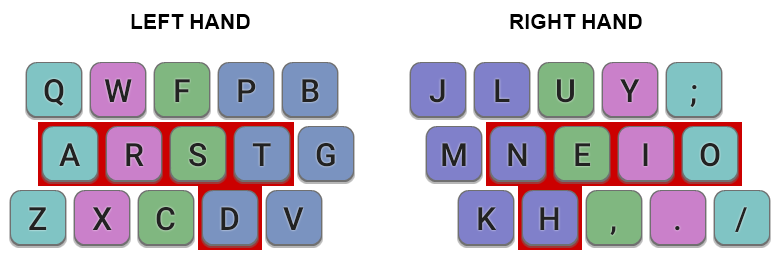
Understanding this pushed me to explore alternatives. You can easily dive deep into this research and lose hours nerding out. I chose Colemak, a modern layout, and specifically the Mod-DH variant which swaps 4 keys for better comfort. For English typing, it’s more ergonomic, faster, and somewhat familiar—numbers and special characters stay mostly the same.
One day to the next, I switched keyboard layouts. The first few days were tough; typing a simple email felt impossible. After a week of daily practice on monkeytype.com and other tools, my speed improved a lot.
With Colemak Mod-DH set, I questioned keyboard design even more and kept reducing keys on my builds. My sweet spot turned out to be 36 keys, much fewer than the typical 78 keys on a MacBook Pro.
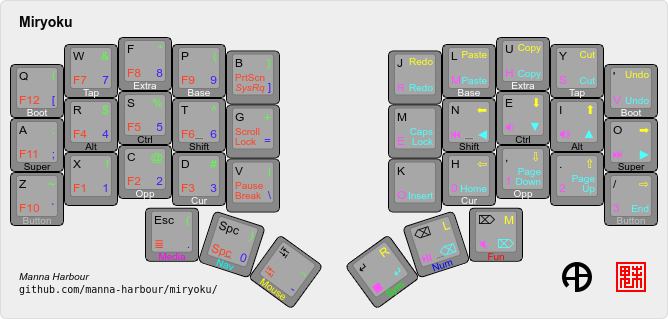
You might wonder how I type everything with so few keys. The secret is layering: thumb keys let me switch layers for numbers, symbols, media controls, and modifiers like Shift and Ctrl. I use the Miryoku firmware, which is brilliant for this. By pressing and holding specific fingers on the opposite side of the split keyboard, I can access modifiers without stretching or moving my hands much. It feels complex initially but becomes second nature and ergonomically friendly.
Reprogramming myself after a lifetime of QWERTY typing took time, but the switch felt necessary. Now, I’m very happy with it. On the go, I use Colemak Mod-DH on my regular MacBook keyboard, and at home, I use my self-made 36-key keyboard. I keep printouts of the Miryoku layers by my screen for quick reference, but it works well overall.
What puzzles me is why the world remains stuck with QWERTY, which is not ergonomic. Why is it still taught in schools? Why are keyboards all square and loaded with keys? Probably because it always has been that way.
What are your thoughts? Have you ever considered switching keyboard layouts or building your own keyboard? Share your experience or questions in the comments!